
CIRC: Secure Multi-Device IRC Client
Overview
CIRC is a desktop application designed as a Chrome app to deliver a seamless IRC (Internet Relay Chat) experience across multiple devices. Built with Chrome APIs, it enables direct connections to any IRC server without relying on proxy services, which enhances privacy and reduces latency. The software is ideal for users who require persistent chat sessions across different machines, such as developers, open-source contributors, and technical communities.
It allows users to retain their nicknames and previously joined channels, ensuring continuity even after reconnection. The ability to maintain a single IRC connection simultaneously across multiple devices supports collaborative workflows, especially for remote teams or individuals managing multiple workstations. While the developer, Flackr, has not provided detailed background information beyond the project’s public repository, the software’s architecture suggests a focus on lightweight, secure, and cross-platform functionality.
Real-world use cases include real-time technical discussions, project coordination, and community moderation. CIRC aims to bridge the gap between traditional IRC clients and modern web-based tools by combining the reliability of native applications with the accessibility of browser-based interfaces.
Key Features & Capabilities
- Direct IRC Server Connection – CIRC connects to any IRC server without requiring a proxy, ensuring low-latency communication and improved security by eliminating third-party intermediaries.
- Multi-Device Sync – User preferences, nicknames, and channel history are synchronized across devices, enabling consistent access to chat sessions regardless of the machine being used.
- Simultaneous Multi-Device Usage – The same IRC connection can be accessed on multiple devices at once, supporting real-time collaboration and seamless transitions between work environments.
- Synced Scripting – Custom scripts written for CIRC are synchronized across all devices, allowing users to maintain automated behaviors and customizations without manual setup.
- Desktop Notifications – Users receive real-time alerts for messages, mentions, and events, improving responsiveness in fast-paced chat environments.
- SSL Server Support – Full compatibility with encrypted IRC servers ensures secure communication and protects sensitive data during transmission.
These features are particularly beneficial for developers managing multiple projects, community moderators coordinating across time zones, and technical teams requiring persistent access to IRC channels. The integration of Chrome APIs allows CIRC to leverage browser-level capabilities while maintaining a desktop application feel. While specific performance benchmarks were not provided, the lightweight nature of the app suggests efficient operation on standard hardware. The project homepage offers documentation and resources for advanced configuration and troubleshooting.
User Interface, Workflow & Performance
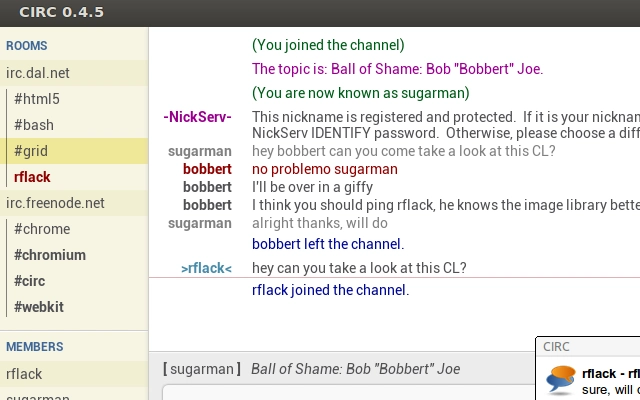
CIRC features a clean, minimalist interface optimized for IRC workflows. The layout prioritizes channel lists, message history, and user input, reducing visual clutter and improving focus. Navigation is intuitive, with a sidebar for channel management and a central pane for chat output.
Users can quickly switch between channels, manage nicknames, and access settings through a streamlined menu system. The workflow is designed to support rapid interaction, with keyboard shortcuts and context-sensitive actions enhancing efficiency. While exact performance details were not specified, the application’s small footprint of 1.5 MB suggests low resource consumption.
The developer did not provide information on CPU or RAM usage patterns. Stability appears to be maintained through consistent updates and reliance on Chrome’s robust runtime environment. Users can expect reliable operation during extended chat sessions, though specific long-term behavior was not documented.
General software behavior patterns indicate smooth performance on modern systems, with minimal lag during message delivery and channel switching.
Compatibility & System Requirements
CIRC is compatible with Windows, Mac, and Linux operating systems, making it accessible to a broad user base across different computing environments. The software is packaged as a Chrome app, which means it runs within the Chrome browser runtime environment. The installation size is 1.5 MB, indicating a lightweight deployment that requires minimal disk space.
The developer did not specify exact system requirements, including minimum RAM, CPU, or Chrome version. As such, compatibility with older or low-end hardware remains unclear. Platform-specific behavior may vary slightly depending on the host OS and Chrome version in use.
Users are advised to ensure their system meets the requirements for running Chrome apps, as outlined in the official documentation. The software’s reliance on Chrome APIs means that updates to the browser runtime may affect functionality. The developer did not provide information on backward compatibility or migration paths for older versions.
Pros and Cons
Pros
- Direct connection to any IRC server without proxy dependency
- Seamless multi-device synchronization of nicknames and channels
- Ability to use the same IRC connection across multiple devices simultaneously
- Synced scripting across all devices for consistent automation
- Support for SSL-encrypted IRC servers enhances security
- Lightweight installation at only 1.5 MB
- Desktop notifications improve message responsiveness
Cons
- Requires Chrome runtime environment, limiting standalone use
- Exact system requirements were not specified
- Performance under heavy load or large channel usage not documented
- Dependence on Chrome updates may impact long-term stability
- Limited official support channels beyond the project homepage
FAQ Section
Is CIRC compatible with all IRC servers?
CIRC supports direct connections to any IRC server, including those with SSL encryption. It does not require a proxy, allowing access to standard and private IRC networks.
Can I use CIRC on multiple devices at the same time?
Yes, the same IRC connection can be used simultaneously on multiple devices, with all user data and session state synchronized across them.
Is CIRC safe to use with encrypted IRC servers?
Yes, CIRC includes SSL server support, enabling secure connections to encrypted IRC networks and protecting data in transit.
How often does CIRC receive updates?
Updates are released periodically by the developer, Flackr, and are typically aligned with Chrome app updates and feature improvements.
Does CIRC require an internet connection to function?
Yes, CIRC requires an active internet connection to maintain IRC connections and synchronize data across devices.
Final Thoughts + CTA
CIRC stands out as a secure, lightweight, and highly functional IRC client tailored for users who demand continuity and consistency across multiple devices. Its ability to maintain a single IRC session simultaneously on various machines, coupled with synced scripting and desktop notifications, makes it a powerful tool for technical professionals and community managers. While it relies on the Chrome runtime and lacks detailed system specifications, its core functionality is well-executed and focused on reliability.
The software delivers a modern, efficient IRC experience without compromising on security or usability. For anyone managing persistent IRC interactions across different workstations, CIRC offers a compelling solution. Download CIRC now.







